Why do relationships do that? Part 3: show me the SQL
In Part 1 of this series, I explained how a relationship model with a single base table turns into joins at runtime. In Part 2, I added a second base table and showed how Tableau runs one query per query tree and stitches the results together.
In my experience, that's still not enough for a lot of Tableau developers to trust relationships. They want to see what Tableau is actually sending to the database. Fair enough! When I wrote Data Modeling with Tableau, I didn't get to this level of detail (and multi-fact relationships didn't exist yet).
So this post goes one step further. I'm pointing Tableau at the bookshop data in Databricks and reading every query it generates. We'll start with a single base table, build up one field at a time, and then move a second fact table into a base table position near the end and run the same worksheets again.
As you know, I think relationships are brilliant. But you need to take the time to understand them.
The starting model
Here's the model we start with. Sales is the only base table. It relates to Edition, which relates to Book and Publisher. Book then relates to Author, Info and Ratings.
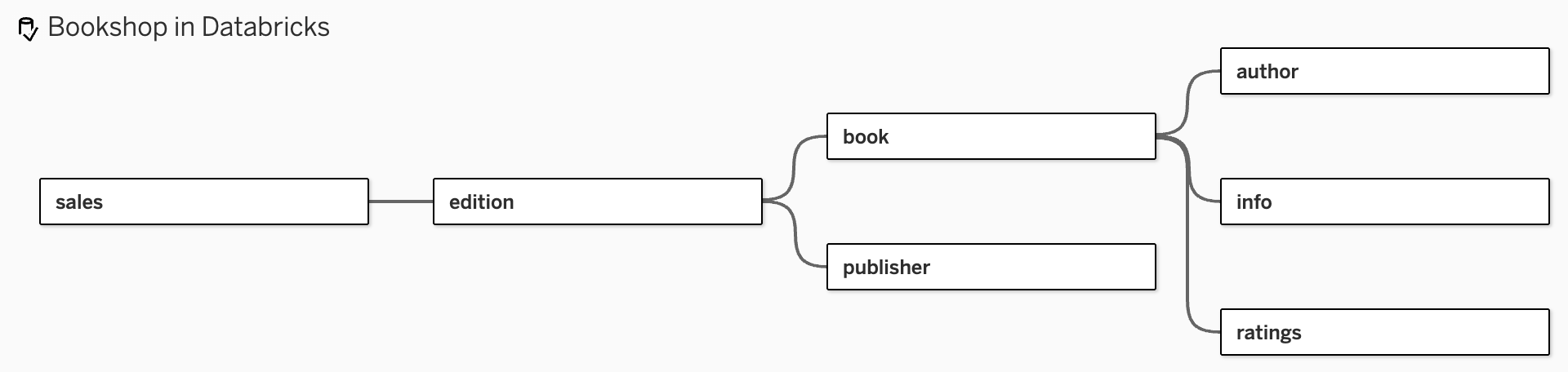
Two things to notice. First, Ratings is a fact table, but for now it's sitting downstream of Book like any other table. We'll move it later. Second, in Part 1 I joined Book and Info into a single logical table. This time I've decided to leave them as separate tables... we aren't bringing in anything from the table anyway.
To follow along, open Worksheet --> View Data Model and toggle Hide Unused Tables. Keep it open as you go. It's the quickest way to see which tables Tableau needs for each view.
Step 1: one dimension, one table
Let's start as simply as possible. Drag Last Name from Author to Rows.
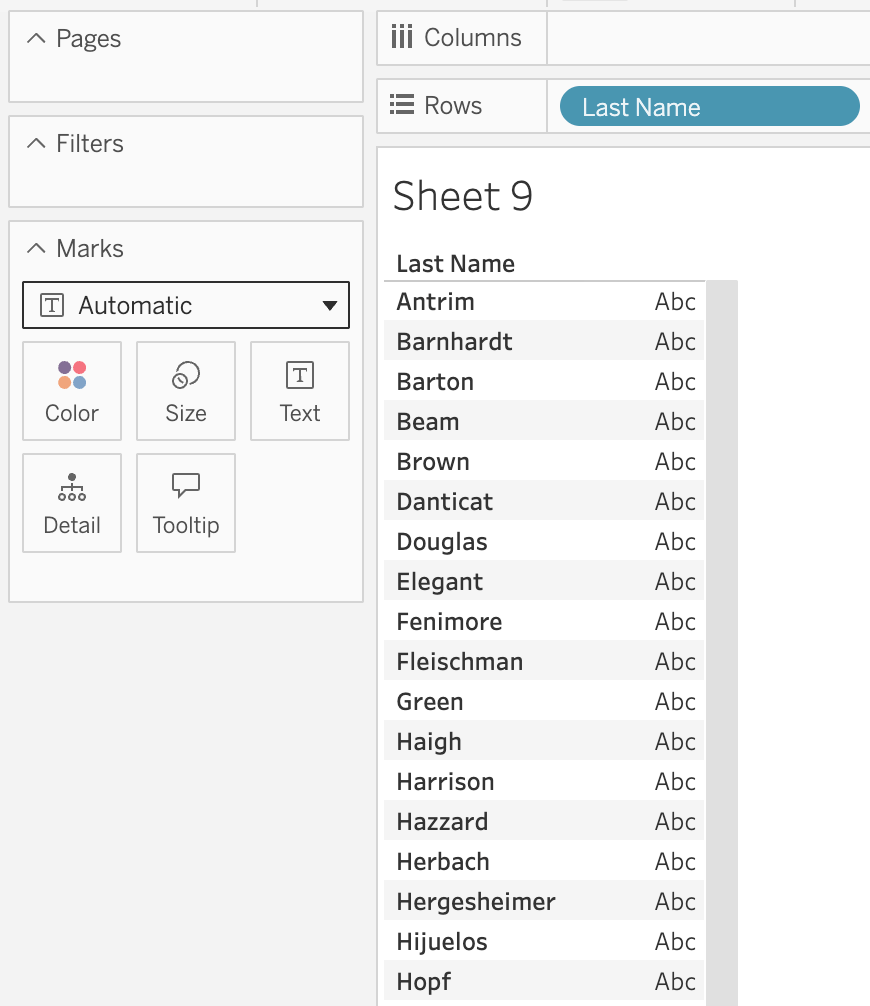
We get a list of author last names (41 marks). View Data Model shows that Tableau only needs the Author table to get this result:

And here's what Tableau sent to Databricks:
SELECT
`author`.`Last_Name` AS `last_name`
FROM
`books`.`default`.`author` `author`
GROUP BY
1
That's it. No Sales, no Edition, no Book. No joins at all. The model has seven tables in it, but the worksheet only asked for one field, so Tableau only queried one table.
Notice there's no DISTINCT either. The GROUP BY 1 does the same job and gives us one row per last name. (In SQL speak, Tableau is grouping by the first column in the SELECT. In business speak, "give me the list of last names, once each.") It also means two authors who share a last name would show up as a single mark, which is why I used AuthorID in Part 1 when I wanted an accurate count.
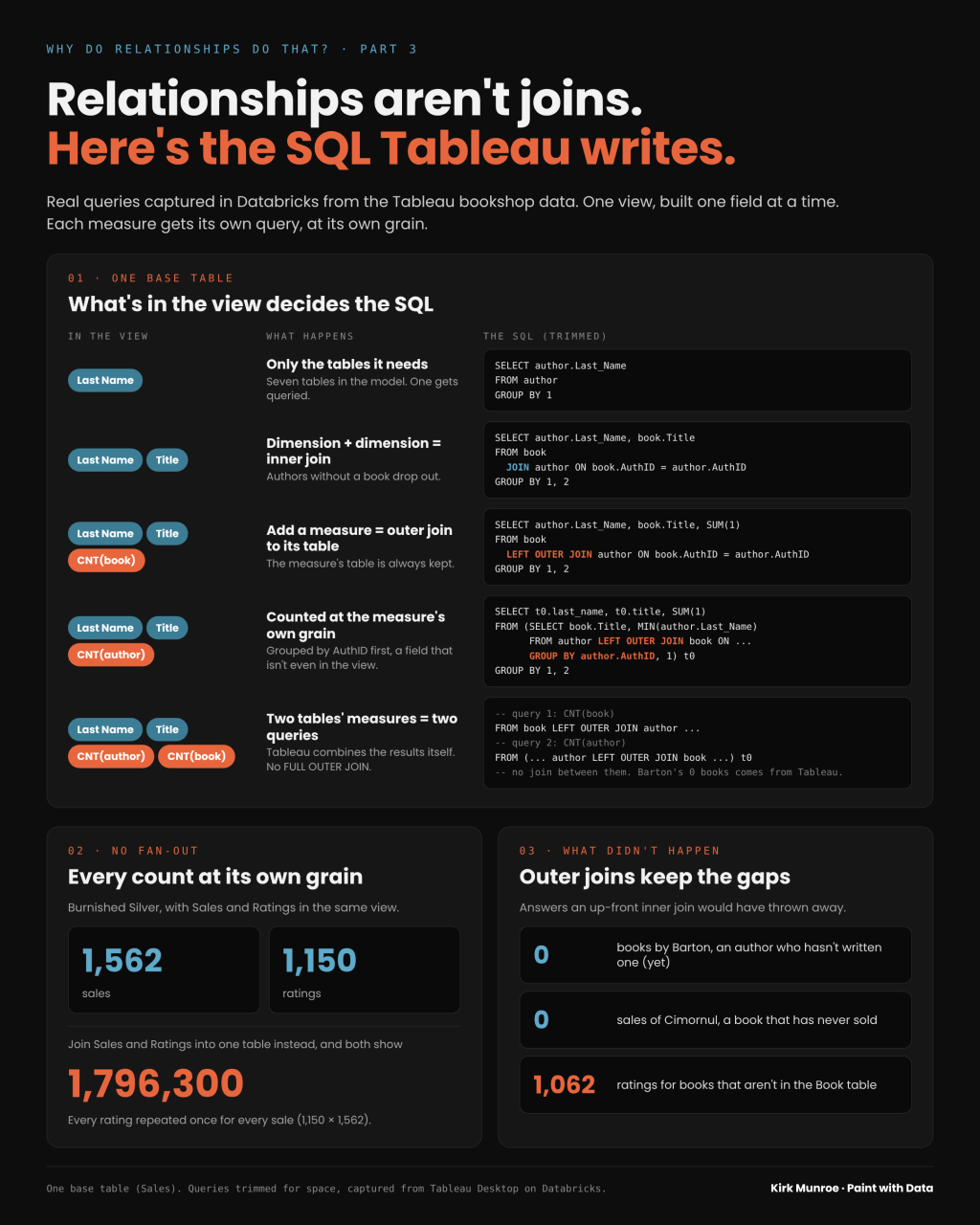
Relationships aren't joins until a worksheet needs them. Tableau only queries the tables it needs for the fields in the view.
Step 2: two dimensions, an inner join
Now pull Title from Book into the view, next to Last Name.
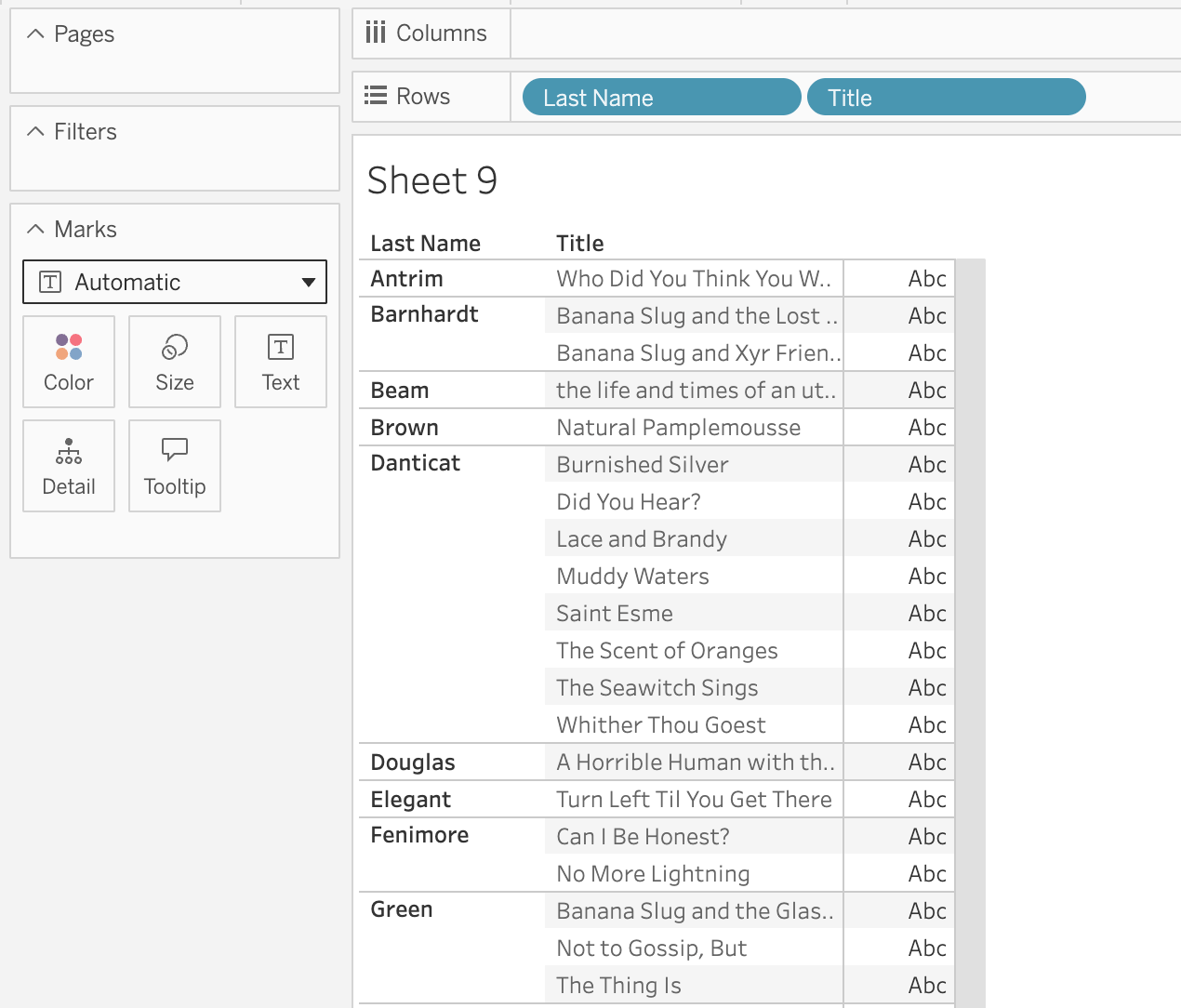
We now have 58 marks. Two dimensions from two tables, so if Part 1 holds, Tableau should inner join them. Here's the SQL:
SELECT
`author`.`Last_Name` AS `last_name`,
`book`.`Title` AS `title`
FROM
`books`.`default`.`book` `book`
JOIN `books`.`default`.`author` `author`
ON (`book`.`AuthID` = `author`.`AuthID`)
GROUP BY
1,
2
There it is. A plain JOIN with no LEFT or OUTER in front of it is an inner join. Tableau joins Book to Author on AuthID, the same field the relationship is defined on, and groups by both fields.
In business speak, Tableau read our view as "show me the authors who have written a book, and the books they wrote." Any author without a book is gone, just like in Part 1. And notice that Sales and Edition still aren't in the query, even though Sales is our base table. Nothing in the view needs them.
Dimension to dimension = inner join. The relationship only becomes a join when the worksheet needs fields from both tables.
Step 3: add a measure, get an outer join
Now let's bring a measure into the view. The easiest one is the row count Tableau generates for every table automatically. Drag Book (Count) to Text.
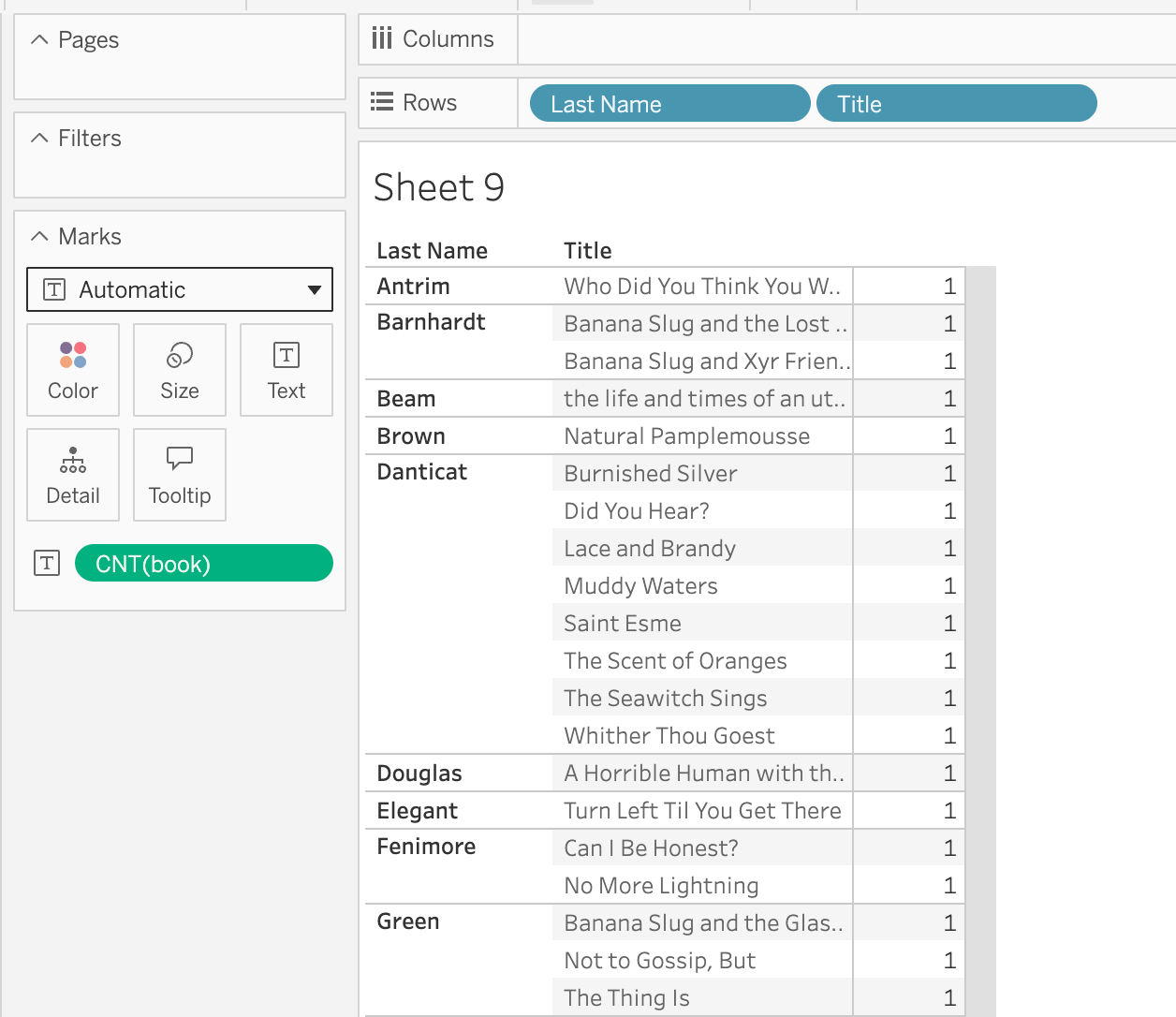
The SQL changes in one important way:
SELECT
`author`.`Last_Name` AS `last_name`,
`book`.`Title` AS `title`,
SUM(1) AS `cnt_book__books_default_book__c9e28d35695643f781a38dae7197b290_`
FROM
`books`.`default`.`book` `book`
LEFT OUTER JOIN `books`.`default`.`author` `author`
ON (`book`.`AuthID` = `author`.`AuthID`)
GROUP BY
1,
2
The JOIN became a LEFT OUTER JOIN, with Book on the left. Because the measure comes from Book, Tableau keeps every row in Book, whether or not it has a matching author. In business speak, "show me every book, and its author if we have one."
Two more things worth pointing out. First, the row count isn't a COUNT(*). It's SUM(1), which adds up a 1 for every row in the table the measure belongs to. Same result, and it's a good reminder of what Book (Count) actually is. Second, that ugly column alias is just Tableau's internal name for the field. You can ignore it.
In our data, every book has an author, so the outer join doesn't add any rows here. The marks are the same as step 2. The join type changed, but the answer didn't, because there were no unmatched books to bring back.
Add a measure = outer join to the table that measure comes from.
Step 4: change which table the measure comes from
Now swap Book (Count) for Author (Count). Same two dimensions, a different measure.
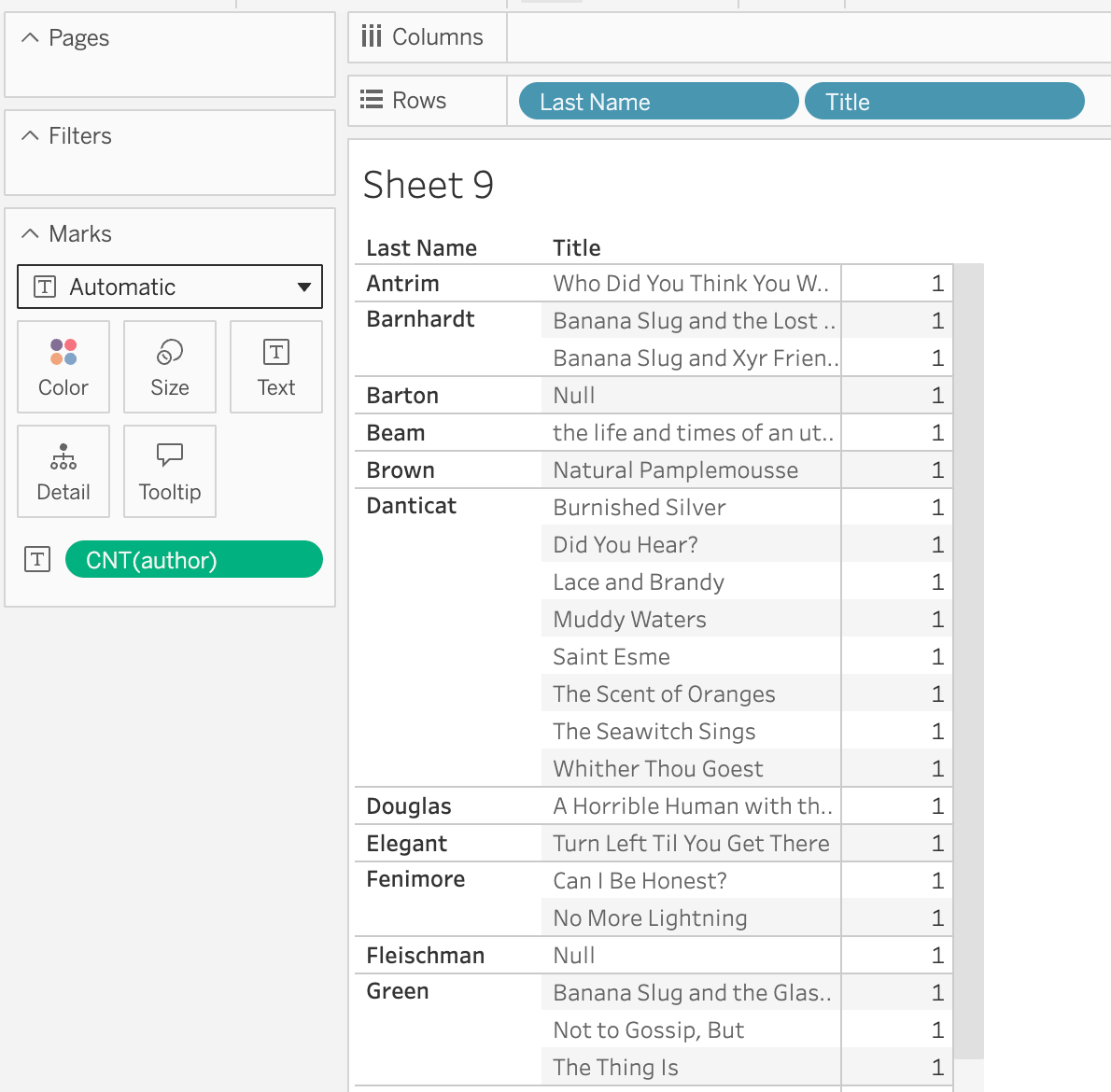
The view changes. We now have 65 marks, and authors like Barton and Fleischman appear with a Null title. These are the authors who haven't (yet) written a book, the "what didn't happen" answers from Part 1.
The SQL changes a lot more than I expected:
SELECT
`t0`.`last_name` AS `last_name`,
`t0`.`title` AS `title`,
SUM(1) AS `cnt_author__books_default_author__14096a6cfbe54d5c9adba40aba1a3`
FROM
(
SELECT
`book`.`Title` AS `title`,
MIN(`author`.`Last_Name`) AS `last_name`
FROM
`books`.`default`.`author` `author`
LEFT OUTER JOIN `books`.`default`.`book` `book`
ON (`author`.`AuthID` = `book`.`AuthID`)
GROUP BY
`author`.`AuthID`,
1
) `t0`
GROUP BY
1,
2
Let's take it from the inside out.
The inner query (t0) flips the join. Author is now on the left of the LEFT OUTER JOIN, so every author is kept, with or without a book. That's where Barton and Fleischman come from.
Then look at the GROUP BY. Tableau groups by author.AuthID, a field that isn't even in our view. That gives one row per author per title. Last Name comes along as MIN(Last_Name). Since every AuthID has exactly one last name, the MIN doesn't change anything. It's just how SQL lets you carry a field along that isn't in the GROUP BY.
The outer query then counts those rows with SUM(1), grouped by Last Name and Title.
Why go to all this trouble? Because the measure is Author (Count), and Tableau wants to count authors, not rows in a joined result. Grouping by AuthID first makes sure each author is counted once per title, at the author's own grain. It also means two different authors who share a last name are still counted as two. In SQL speak, Tableau aggregates to the grain of the table the measure comes from before it rolls up to the level of the view. In business speak, "count authors, not author-book combinations."
This is the part I think people miss about relationships. They're not just Tableau writing the same joins you would write by hand. Tableau rewrites the query so the measure can't be inflated by the join.
Add a measure = outer join to that table, and Tableau counts it at that table's grain.
Step 5: both measures, and it isn't really an outer join
So far, the heuristic has been "add a measure, get an outer join to that table." But what happens when we bring in measures from both tables? Put Book (Count) and Author (Count) in the view together, using Measure Names and Measure Values.
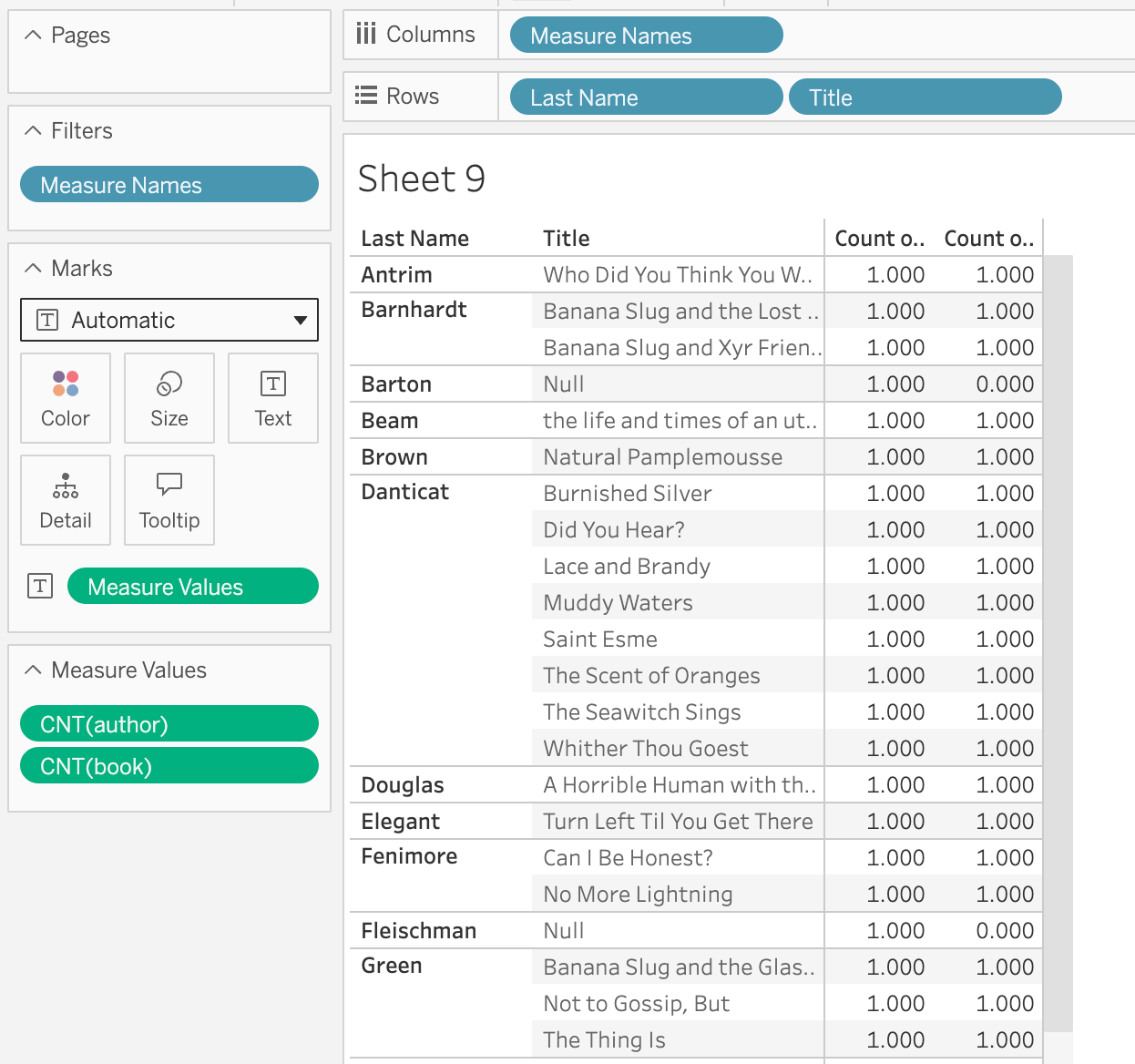
Look at Barton. Author (Count) is 1 and Book (Count) is 0. Not blank. Zero.
If Tableau were writing one query with an outer join, that wouldn't be possible. To keep Barton, it would need Author on the preserved side. To count books properly, it would need Book on the preserved side. One LEFT OUTER JOIN can't do both.
So what did Tableau send? After a Data → Refresh, Databricks shows two queries with the same timestamp.
First, Book (Count):
SELECT
`author`.`Last_Name` AS `last_name`,
`book`.`Title` AS `title`,
SUM(1) AS `cnt_book__books_default_book__c9e28d35695643f781a38dae7197b290_`
FROM
`books`.`default`.`book` `book`
LEFT OUTER JOIN `books`.`default`.`author` `author`
ON (`book`.`AuthID` = `author`.`AuthID`)
GROUP BY
1,
2
Then Author (Count):
SELECT
`t0`.`last_name` AS `last_name`,
`t0`.`title` AS `title`,
SUM(1) AS `cnt_author__books_default_author__14096a6cfbe54d5c9adba40aba1a3`
FROM
(
SELECT
`book`.`Title` AS `title`,
MIN(`author`.`Last_Name`) AS `last_name`
FROM
`books`.`default`.`author` `author`
LEFT OUTER JOIN `books`.`default`.`book` `book`
ON (`author`.`AuthID` = `book`.`AuthID`)
GROUP BY
`author`.`AuthID`,
1
) `t0`
GROUP BY
1,
2
Look familiar? They're the queries from steps 3 and 4, word for word. The first starts from Book, so Barton isn't in its results at all. The second starts from Author, so he is. There's no third query that joins the two, no FULL OUTER JOIN, and no COALESCE or IFNULL to turn a missing count into a 0.
(A tip if you're following along: the first time I built this view, Databricks didn't get any new queries at all. Tableau already had both results cached from steps 3 and 4, so it built the view without going back to the database. Use Data → Refresh if you want to see the queries.)
That means the 0 doesn't come from the database. Tableau gets one result per measure, each one built at its own table's grain, and then combines them itself. Barton is in the Author (Count) result but not in the Book (Count) result, so Tableau fills in a 0 on purpose. In business speak, "Barton is an author, and he has written zero books." That's a much more useful answer than a blank.
Measures from two tables = one query per measure, combined by Tableau. Each measure gets its own outer join. The result looks like an outer join in both directions, but no such join was ever written.
Step 6: bring in the base table
Up to now, our base table hasn't been in a single query. Let's fix that. Add Sales (Count) to Measure Values, next to the two counts we already have.
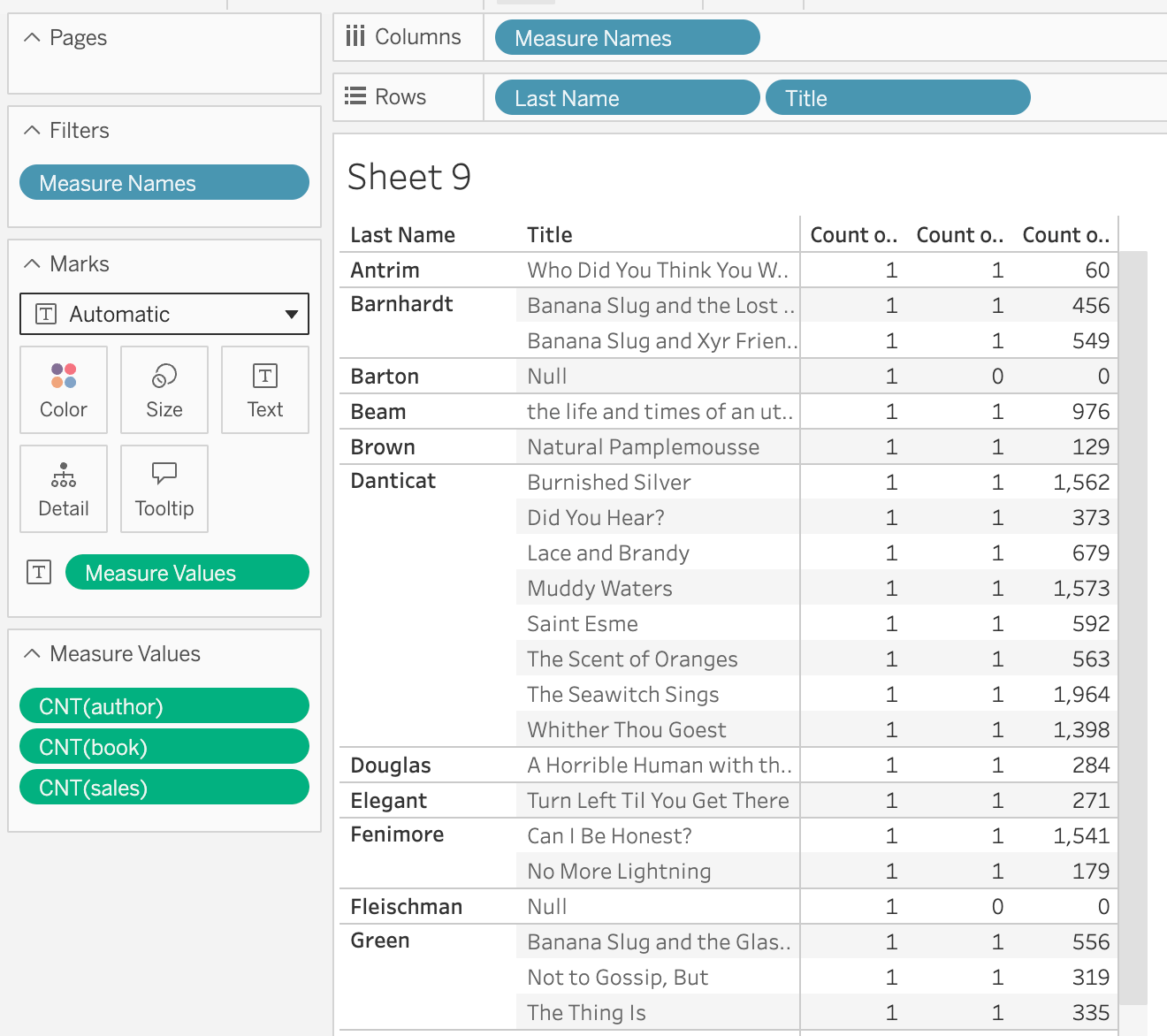
Here's the new query:
SELECT
`author`.`Last_Name` AS `last_name`,
`book`.`Title` AS `title`,
SUM(1) AS `cnt_sales__books_default_sales__b1da6803a5f04cb4abd63dc1645086e`
FROM
`books`.`default`.`sales` `sales`
LEFT OUTER JOIN `books`.`default`.`edition` `edition`
ON (`sales`.`ISBN` = `edition`.`ISBN`)
LEFT OUTER JOIN `books`.`default`.`book` `book`
ON (`edition`.`BookID` = `book`.`BookID`)
LEFT OUTER JOIN `books`.`default`.`author` `author`
ON (`book`.`AuthID` = `author`.`AuthID`)
GROUP BY
1,
2
The measure comes from Sales, so Sales goes on the preserved side and Tableau walks the relationships out from there: Sales to Edition to Book to Author. Notice that Edition is in the query even though there isn't a single Edition field in the view. Tableau needs it because it's the only path from a sale to a book.
The other two measures don't change at all. They're the same queries from step 5 (and if you don't refresh, Tableau won't even send them again). Three measures from three tables, three queries, combined by Tableau.
Now look at what the combined view tells us:
• Barton, Fleischman, Hijuelos and Inez have 1 author, 0 books and 0 sales. Authors who haven't written anything (yet).
• Cimornul by Hergesheimer has 1 author, 1 book and 0 sales. A book that has never sold.
• Burnished Silver has 1,562 sales. That number isn't multiplied by anything, even though the view also counts authors and books.
In business speak, one simple view answers "who hasn't written a book?", "which books haven't sold?" and "how many copies did each book sell?" at the same time. Try doing that with one big joined table. You'd lose either the authors without books or the books without sales, depending on which way you joined.
Each measure walks its own path from its table to the fields in the view. Tables in between get pulled in only because they're on that path.
Step 7: a second fact table, still downstream
Ratings is a fact table too, but in this model it's just another table hanging off Book. Let's add Ratings (Count) to the view and see what Tableau does with it.
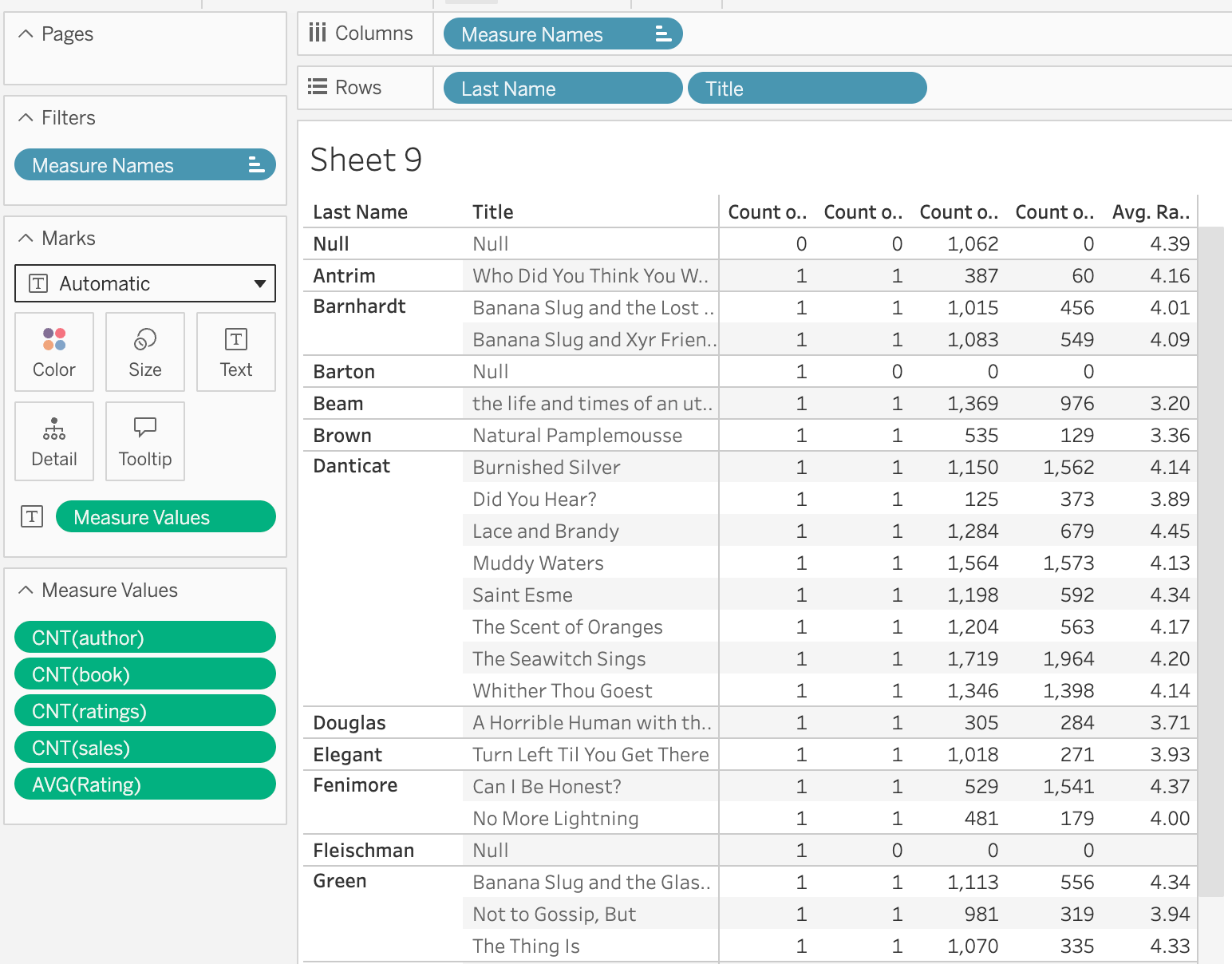
Here's the new query:
SELECT
`author`.`Last_Name` AS `last_name`,
`book`.`Title` AS `title`,
SUM(1) AS `cnt_ratings__books_default_ratings__391a93e7b0994c299191c25ee46`
FROM
`books`.`default`.`ratings` `ratings`
LEFT OUTER JOIN `books`.`default`.`book` `book`
ON (`ratings`.`BookID` = `book`.`BookID`)
LEFT OUTER JOIN `books`.`default`.`author` `author`
ON (`book`.`AuthID` = `author`.`AuthID`)
GROUP BY
1,
2
Same pattern as step 6. Ratings is on the preserved side, and Tableau walks out to Book and Author. Sales and Edition aren't in this query at all, even though Sales is our only base table. The ratings never need to go anywhere near the sales.
That's why the numbers are right. Burnished Silver has 1,150 ratings and 1,562 sales. If we had joined Sales and Ratings into one table, every rating would repeat once for every sale of the same book, and both counts would show 1,796,300 (1,150 × 1,562). Instead, each count is calculated at its own grain.
Now look at the very first row. Last Name is Null, Title is Null, and there are 1,062 ratings, with 0 authors, 0 books and 0 sales. These are ratings for a BookID that doesn't exist in the Book table. Because the measure comes from Ratings, the LEFT OUTER JOIN keeps them, and they land in a Null row.
In business speak, "we have 1,062 ratings for books we don't know about." That's a data quality problem, and relationships found it for us for free. If you had inner joined these tables up front, those ratings would have silently disappeared, and you'd never know they existed.
The measure's table is always preserved. Including the rows that don't match anything.
Step 8: filter one fact, and watch the other
First, a small addition. I added AVG(Rating) to the view so we can watch the ratings move. Notice that Barton and Fleischman show 0 for every count but a blank for the average. An author with no books really has zero books. But an average of nothing isn't zero, so Tableau leaves it empty.
Now the filter. I created a calculation, Rating 4 or 5, and kept only True. This removes individual ratings, not books.
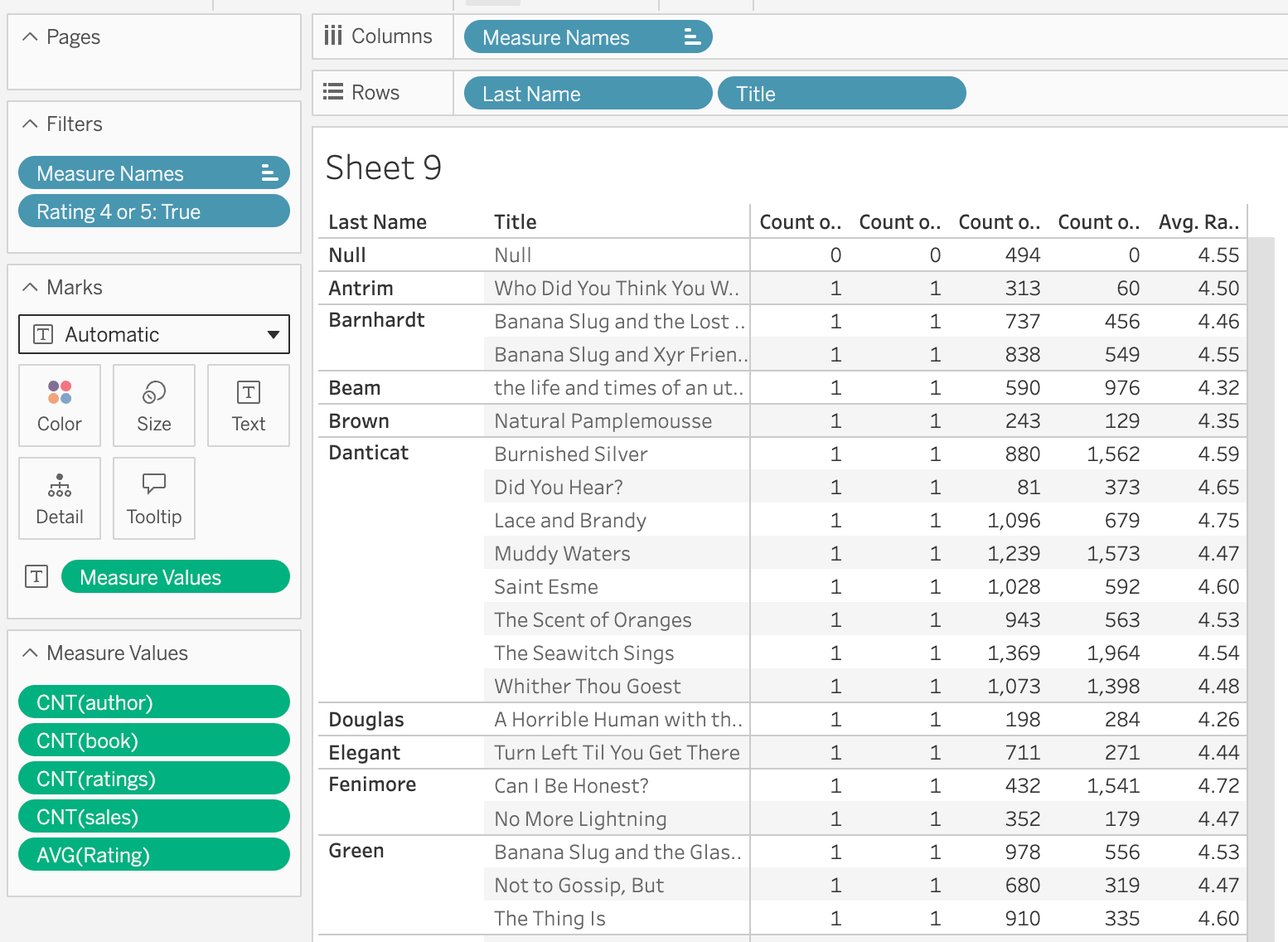
As expected, the average rating goes up everywhere (Burnished Silver goes from 4.14 to 4.59) and the ratings count goes down (1,150 to 880). The surprise is in the Sales query:
SELECT
`t0`.`last_name` AS `last_name`,
`t0`.`title` AS `title`,
SUM(1) AS `cnt_sales__books_default_sales__b1da6803a5f04cb4abd63dc1645086e`
FROM
`books`.`default`.`sales` `sales`
JOIN (
SELECT
`sales`.`ISBN` AS `isbn`,
`author`.`Last_Name` AS `last_name`,
MIN(`book`.`Title`) AS `title`
FROM
`books`.`default`.`sales` `sales`
JOIN `books`.`default`.`edition` `edition`
ON (`sales`.`ISBN` = `edition`.`ISBN`)
JOIN `books`.`default`.`book` `book`
ON (`edition`.`BookID` = `book`.`BookID`)
LEFT OUTER JOIN `books`.`default`.`author` `author`
ON (`book`.`AuthID` = `author`.`AuthID`)
JOIN `books`.`default`.`ratings` `ratings`
ON (`edition`.`BookID` = `ratings`.`BookID`)
WHERE
(`ratings`.`Rating` IN (4, 5))
GROUP BY
1,
2
) `t0`
ON (`sales`.`ISBN` = `t0`.`isbn`)
GROUP BY
1,
2
Ratings is now in the Sales query. With one base table, Ratings lives in the same query tree as Sales, so a filter on Ratings has to be applied to Sales too.
But look at how Tableau does it. It doesn't just join Ratings onto Sales. That would repeat every sale once for every 4 or 5 star rating of the same book, and the sales count would explode.
Instead, the inner query (t0) builds a list. It finds every ISBN whose book has at least one 4 or 5 star rating, and the GROUP BY squashes that down to one row per ISBN. Then the outer query joins Sales to that list. Each sale matches exactly one row, so it's counted exactly once. In SQL speak, this is a semi-join. In business speak, "count the sales of the books that have at least one good rating."
The joins have changed too. Inside t0, Edition, Book and Ratings are now plain JOINs (inner joins), not LEFT OUTER JOINs. That makes sense. A sale can only pass a filter on Ratings if there's a rating to check.
And the sales numbers? For every book still in the view, they don't change. Burnished Silver still has 1,562 sales. What changes is which books are in the view. Barton, Fleischman, Hijuelos and Inez are gone, and so is Cimornul, the book with no sales and no ratings. They had nothing that could pass the filter.
The other three queries follow the same idea. The Ratings query is the simplest. The filter is just a WHERE on the table it belongs to:
SELECT
`author`.`Last_Name` AS `last_name`,
`book`.`Title` AS `title`,
SUM(1) AS `cnt_ratings__books_default_ratings__391a93e7b0994c299191c25ee46`,
AVG(CAST(`ratings`.`Rating` AS DOUBLE)) AS `avg_rating_ok`
FROM
`books`.`default`.`ratings` `ratings`
LEFT OUTER JOIN `books`.`default`.`book` `book`
ON (`ratings`.`BookID` = `book`.`BookID`)
LEFT OUTER JOIN `books`.`default`.`author` `author`
ON (`book`.`AuthID` = `author`.`AuthID`)
WHERE
(`ratings`.`Rating` IN (4, 5))
GROUP BY
1,
2
Notice the joins to Book and Author are still LEFT OUTER. That's why the Null row survives, down from 1,062 ratings to 494. Also notice that AVG(Rating) doesn't get a query of its own. It comes from the same table at the same grain, so Tableau puts it in the same query as Ratings (Count).
The Book (Count) query builds a list of books with at least one good rating, one row per BookID, then joins out to Author:
SELECT
`author`.`Last_Name` AS `last_name`,
`t0`.`title` AS `title`,
SUM(1) AS `cnt_book__books_default_book__c9e28d35695643f781a38dae7197b290_`
FROM
(
SELECT
MIN(`book`.`AuthID`) AS `authid`,
MIN(`book`.`Title`) AS `title`
FROM
`books`.`default`.`book` `book`
JOIN `books`.`default`.`ratings` `ratings`
ON (`book`.`BookID` = `ratings`.`BookID`)
WHERE
(`ratings`.`Rating` IN (4, 5))
GROUP BY
`book`.`BookID`
) `t0`
LEFT OUTER JOIN `books`.`default`.`author` `author`
ON (`t0`.`authid` = `author`.`AuthID`)
GROUP BY
1,
2
And the Author (Count) query does the same thing, one row per AuthID. It's the step 4 query with Ratings inner joined into the subquery and the filter added:
SELECT
`t0`.`last_name` AS `last_name`,
`t0`.`title` AS `title`,
SUM(1) AS `cnt_author__books_default_author__14096a6cfbe54d5c9adba40aba1a3`
FROM
(
SELECT
`book`.`Title` AS `title`,
MIN(`author`.`Last_Name`) AS `last_name`
FROM
`books`.`default`.`author` `author`
JOIN `books`.`default`.`book` `book`
ON (`author`.`AuthID` = `book`.`AuthID`)
JOIN `books`.`default`.`ratings` `ratings`
ON (`book`.`BookID` = `ratings`.`BookID`)
WHERE
(`ratings`.`Rating` IN (4, 5))
GROUP BY
`author`.`AuthID`,
1
) `t0`
GROUP BY
1,
2
The Author query now uses an inner JOIN to Book, not the LEFT OUTER JOIN from step 4. That's where Barton, Fleischman, Hijuelos and Inez went. With no books, they have no ratings, so they can't pass the filter.
Put the four queries side by side and the pattern is clear. Each one is still counted at its own grain. The filter is applied to every one of them. And whenever Ratings has to be joined in to apply the filter, Tableau first squashes the result down to one row per key of the measure's table (ISBN for sales, BookID for books, AuthID for authors). That way, the join to Ratings can never inflate the count.
With one base table, a filter on any table restricts the whole tree. Tableau is careful not to inflate the measures while it does it.
Step 9: move Ratings to a base table position
Now for the switch. I dragged Ratings into a base table position, related to Book, and left everything else alone. Same view, same Rating 4 or 5 filter. Our model now has two query trees: Sales → Edition → Book, and Ratings → Book. They share Book and everything hanging off it (Author and Info).

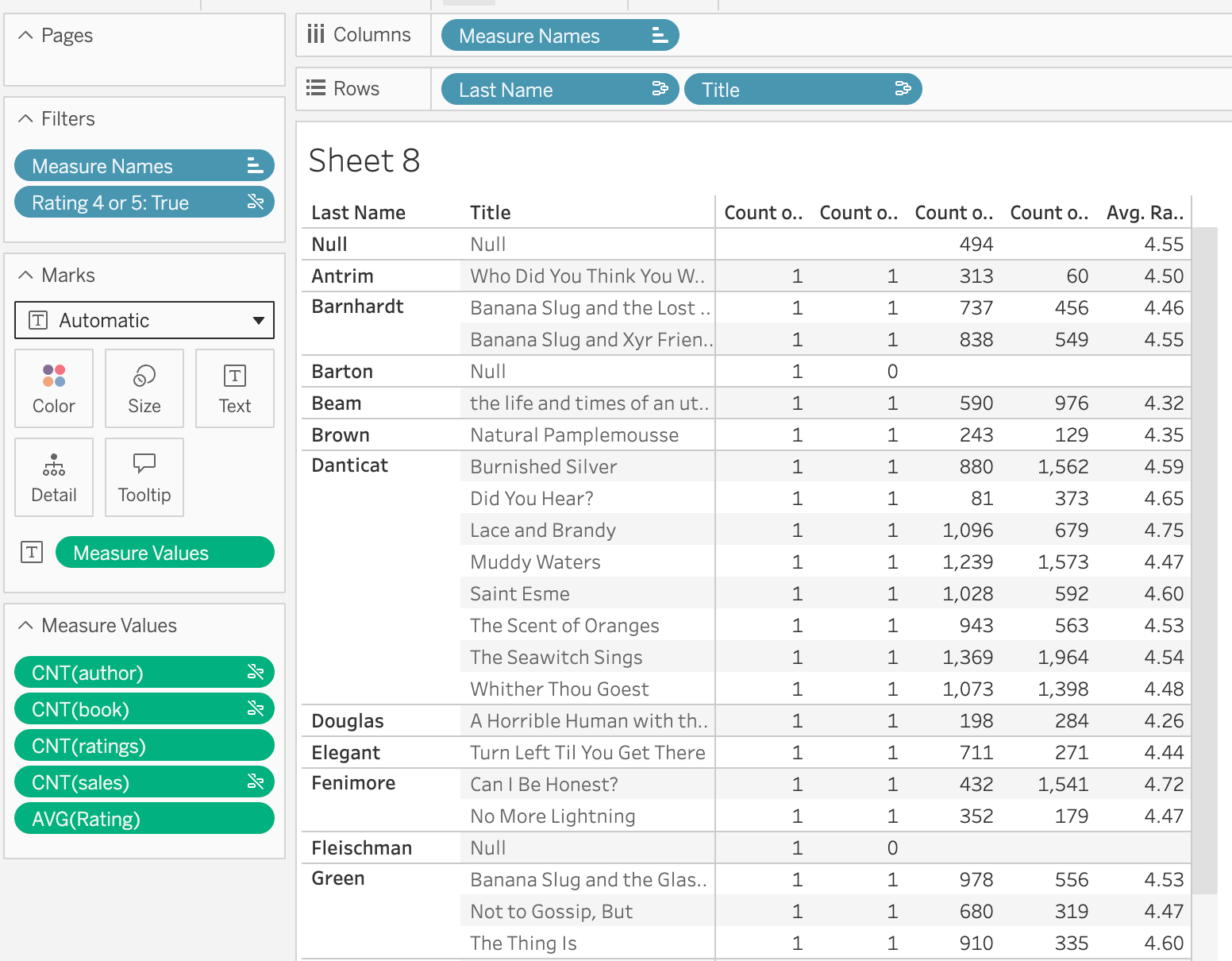
The view changes straight away. Barton, Fleischman, Hijuelos, Inez and Cimornul are all back. The sales counts are the same as before the filter (Burnished Silver still has 1,562), while the ratings are still filtered (880 ratings, 4.59 average).
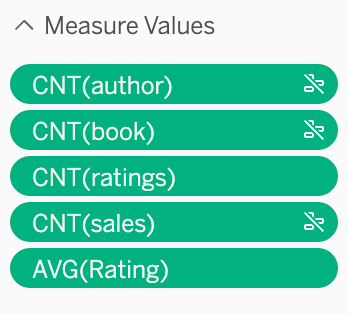
And look at the measure pills. CNT(author), CNT(book) and CNT(sales) now have a little broken-link icon. That's Tableau telling you that the Rating 4 or 5 filter doesn't apply to them. It's the UI version of everything the SQL is about to show us.
The Ratings query
SELECT
`author`.`Last_Name` AS `last_name`,
`book`.`Title` AS `title`,
AVG(CAST(`ratings`.`Rating` AS DOUBLE)) AS `x_measure__0`,
SUM(1) AS `x_measure__1`
FROM
`books`.`default`.`ratings` `ratings`
LEFT OUTER JOIN `books`.`default`.`book` `book`
ON (`ratings`.`BookID` = `book`.`BookID`)
LEFT OUTER JOIN `books`.`default`.`author` `author`
ON (`book`.`AuthID` = `author`.`AuthID`)
WHERE
(`ratings`.`Rating` IN (4, 5))
GROUP BY
1,
2
This is essentially the same query as step 8. The filter is a simple WHERE on the table it belongs to.
The Sales, Book and Author queries
There weren't any. Tableau didn't send a single new query for Sales (Count), Book (Count) or Author (Count). With Ratings in its own query tree, the filter doesn't apply to those measures, so the answers are exactly what they were back in step 7, before we added the filter. Tableau already had them cached, so it just reused them.
[Confirm: after a Data → Refresh, do the Sales, Book and Author queries come back exactly as in steps 4, 5 and 6?]
Compare that to step 8. There, Tableau rewrote every one of those queries with a semi-join against Ratings. Here, it doesn't touch them at all.
The extra queries
Tableau also sent a domain query for Last Name (the same one from step 1) and four queries that evaluate our filter calculation. Here's one of them:
SELECT
(`ratings`.`Rating` IN (4, 5)) AS `calculation_0001159774486530`
FROM
(
SELECT
`book`.`BookID` AS `bookid`,
`book`.`BookID` AS `bookid__book_`
FROM
`books`.`default`.`book` `book`
) `t0`
LEFT OUTER JOIN `books`.`default`.`ratings` `ratings`
ON (`t0`.`bookid__book_` = `ratings`.`BookID`)
WHERE
(`ratings`.`BookID` IS NULL)
LIMIT 1
It's asking, "is there at least one book with no ratings at all, and if so, what does Rating 4 or 5 evaluate to for it?" (The answer is Null, because there's no rating to check.) The other three ask the same question along different paths:
|
Path |
What
it's looking for |
|
Book → Ratings |
a book with no ratings |
|
Author → Book → Ratings |
an author with no book, or a book with no
ratings |
|
Info → Book → Ratings |
an Info
row with no book, or a book with no ratings |
|
Ratings alone (GROUP BY 1, no LIMIT) |
every value the calculation can return |
(Info shows up because it's a separate table related to Book in this model, so it's one more path into Ratings.)
I can't tell you exactly how Tableau uses the answers. My best read is that it's working out how the filter should treat members of the shared dimensions that have no ratings at all, since the calculation returns Null for them. These checks only appeared once Ratings became a base table. It's also a hint that a calculated filter and a plain dimension filter might not behave the same way in a multi-fact model, which is a topic for another post.
Zeros and blanks
One last thing in the view. In step 5, Barton got a 0 for Book (Count). He still does. But his ratings and sales are now blank, not 0. Cimornul gets a 0 for sales but a blank for ratings. And the Null row (the orphan ratings) gets blanks for author, book and sales.
With more than one base table, a filter on one fact stays in its own query tree. The other facts, and the shared dimensions, aren't filtered at all.
There you have it
Nine steps, one view, and a lot of SQL. Here's what it adds up to:
1. Tableau only queries the tables it needs. Relationships aren't joins until a worksheet needs them.
2. Dimension to dimension = inner join.
3. Add a measure = outer join to that measure's table, and Tableau counts it at that table's grain, even if that means grouping by a key that isn't in the view.
4. Measures from different tables = one query per measure, combined by Tableau, not by the database. No FULL OUTER JOIN required.
5. The measure's table is always preserved, including rows that don't match anything (hello, 1,062 orphan ratings).
And the one that depends on your model:
|
Where
the filtered table sits |
What
happens to the other measures |
|
Same query tree (one base table) |
Filtered too. Tableau uses a semi-join,
so their counts can't be inflated, but members with nothing that passes the
filter drop out of the view. |
|
Its own query tree (multi-fact) |
Not filtered at all. Tableau doesn't even
send new queries for them. |
Neither one is wrong. They answer different questions. With one base table, the view answers "how did the books with at least one good rating sell?" With two base tables, it answers "how did every book sell, and what were its good ratings?" The model decides which question you're asking, so it's worth knowing which one you've built.
That's why I keep saying relationships are brilliant. Every query we looked at was built to keep each measure at its own grain, without any LODs, COUNTDs or hand-written subqueries. But you do have to take the time to understand them. Keep View Data Model open, look for the broken-link icons on your pills, and if something looks off, go and read the SQL. It's less scary than you think.